This service is exclusively for PC PLUS customers only. Please do not make any changes without expert advice.
Webmail Login
Access your email directly through our webmail interface:
For authorized users only. Unauthorized access is prohibited.
Login to Webmail
Mail Client Configuration
Important: Incorrect configuration may lead to email access issues. PC PLUS is not responsible for problems caused by unauthorized changes.
Secure SSL/TLS Settings (Recommended)
Non-SSL Settings (Not Recommended)
Setup Guide
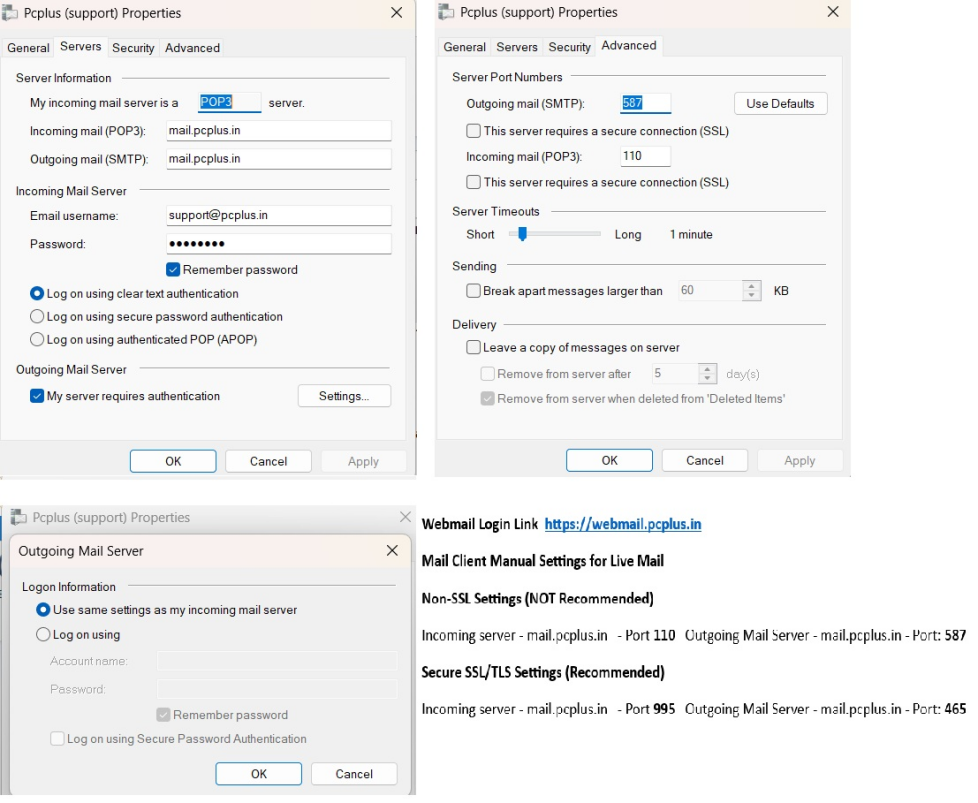
For your security and to prevent service disruption, we recommend contacting our support team for assistance with email setup.
Contact Support
Disclaimer: The webmail service and configuration instructions are provided for PC PLUS customers only. Any modifications made without proper technical guidance may result in service interruption. PC PLUS shall not be liable for any damages or issues arising from unauthorized configuration changes.